Personal Information Screen
What is this screen?
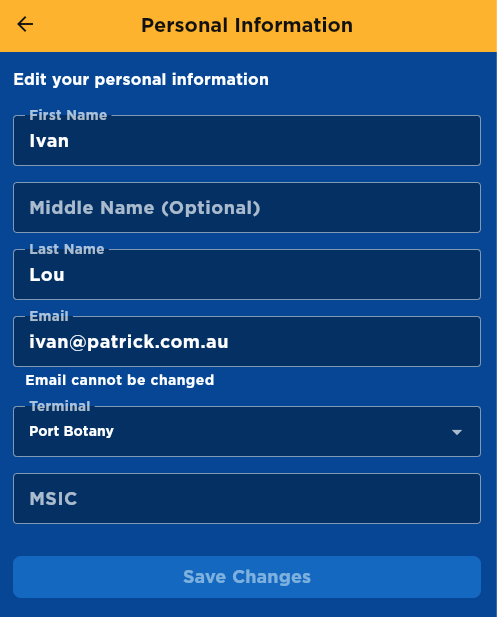
The Personal Information Screen allows you to view and edit your profile details. Here you can update your name, contact information, and terminal assignment. The MSIC field is always available for entering a new Maritime Security Identification Card number when you receive a renewed card.
What can you do here?
- View your current information: See all your registered details including name, email, and terminal
- Update your name: Change your first name, middle name, and last name
- Change your terminal: Select a different assigned terminal location (Port Botany or Fremantle)
- Update your MSIC: Enter your new MSIC number when you receive a renewed card (the MSIC field is always displayed but always empty)
- Save changes: Update your profile with new information using the Save Changes button
Understanding the screen
Profile Information Fields
You'll see the following fields:
- First Name: Your first name (required field, editable)
- Middle Name (Optional): Your middle name if applicable (editable)
- Last Name: Your last name/surname (required field, editable)
- Email: Your registered email address (read-only - cannot be changed in the app)
- Terminal: Your assigned terminal location (editable via dropdown)
- MSIC: Enter your new MSIC number when you receive a new card (field is always displayed but always empty - use it when you get a renewed MSIC)
Available Terminals
- Port Botany: PBT terminal code
- Fremantle: FRT terminal code
Edit vs. Read-Only Fields
Some fields can be edited, while others are locked:
- Editable fields: First Name, Middle Name, Last Name, Terminal, and MSIC can be modified
- Read-only fields: Email displays information but cannot be changed directly in the app
How to use this screen
Edit your information
- Tap on any editable field
- Use the keyboard to make changes
- Review your changes
- Select your terminal from the dropdown if needed
- If you receive a new MSIC card, enter the new number in the MSIC field (the field is always displayed but always empty)
Save your changes
- After editing, look for a Save button (usually at the bottom or top-right)
- Tap Save to confirm your updates
- Wait for confirmation that changes were saved
- Your new information is now active
Cancel changes
If you want to discard your changes:
- Tap the back arrow or Cancel button
- Confirm you want to discard changes if prompted
- Your original information is preserved
Mobile tips
- Check before saving: Review your changes carefully before tapping Save
- Keep information current: Update your details whenever they change
- MSIC field: The MSIC field is always displayed but always empty. Use it to enter your new MSIC number when you receive a renewed card. Your existing MSIC is not displayed for security.
- Note read-only fields: Some information like Email may need to be changed through other channels (contact support if needed)
- Save button enables automatically: The Save button only becomes active when you've made changes to your profile
Common questions
Q: Why can't I edit my email address?
Email addresses are locked for security reasons. If you need to change your email, contact support or your administrator.
Q: Can I change my terminal?
Yes, you can select a different terminal from the Terminal dropdown. Choose your assigned terminal location (Port Botany or Fremantle) and save your changes.
Q: What is MSIC?
MSIC stands for Maritime Security Identification Card. It's an identification card required for unescorted access to secure areas of maritime facilities and ships. All users must have a valid MSIC to use the app.
Q: Why don't I see my current MSIC number?
For security and privacy reasons, your existing MSIC number is not displayed. The MSIC field is always shown but always empty - use it only when you receive a new MSIC card.
Q: When do I need to update my MSIC?
MSIC cards are typically valid for a few years. When you receive a renewed MSIC card, enter the new number in the MSIC field and save your changes.
Q: What if I don't need to update my MSIC?
Simply leave the MSIC field blank. The field is always displayed but you only need to enter a value when you have a new MSIC card to register.
Q: What if I don't have a middle name?
The Middle Name field is optional. You can leave it blank if you don't have a middle name.
Q: How long does it take for changes to take effect?
Changes typically take effect immediately after saving. You'll see your updated information throughout the app right away.
Q: What if I make a mistake?
You can come back to this screen anytime to correct mistakes. Just edit the field again and save your changes.
Q: Are there any character limits?
Yes, name fields have character limits. The app will let you know if you've exceeded the limit.
Q: Can I change my name to anything?
You can update your name fields as needed. Use your correct legal name to ensure proper identification at terminal locations.
Q: What if a field I need to change is locked?
Contact terminal support or your administrator. Some fields like Email require verification or approval to change.
Q: Will my changes be visible to others?
Your name and some details may be visible to terminal staff.
Q: What happens if I lose internet connection while saving?
You'll see an error message. Check your connection and try saving again. Your changes won't be lost if you stay on the screen.