Complete Your Profile
What is this screen?
The Complete Your Profile screen appears after you sign up for your account. It collects essential information needed to set up your driver profile and verify your identity.
What can you do here?
- Enter your personal information: First name, middle name (optional), and last name
- Provide your MSIC number: Your Maritime Security Identification Card number
- Select your terminal: Choose which port terminal you work with
- Submit your profile: Complete the setup process to access the app
Understanding the screen
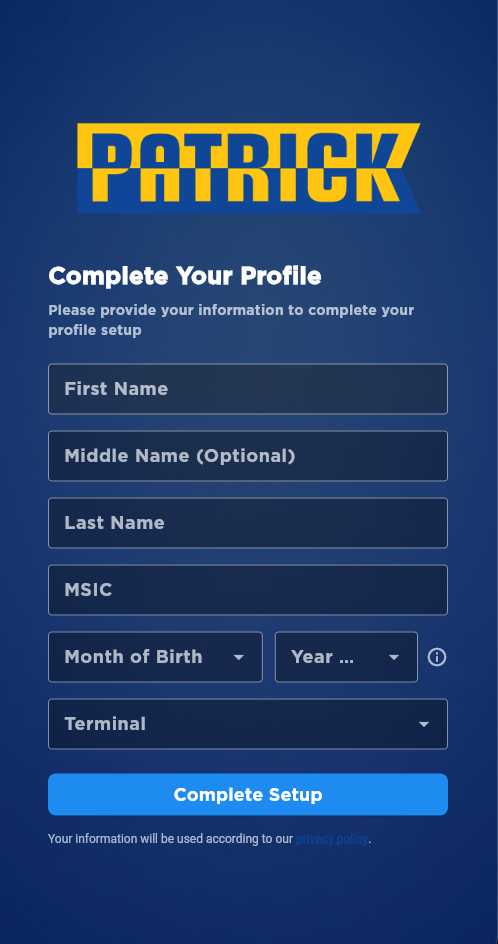
The screenshot above shows the Complete Your Profile setup screen with input fields for personal information (first name, middle name, last name), MSIC, terminal selection, and the "Complete Setup" button to finalize your profile creation.
Required Fields
All fields except "Middle Name" must be completed:
- First Name: Your first name (required)
- Middle Name: Your middle name (optional)
- Last Name: Your last name (required)
- MSIC: Your Maritime Security Identification Card number (required) - entered in uppercase
- Terminal: The port terminal where you work (required)
Available Terminals
- Port Botany: PBT terminal code
- Fremantle: FRT terminal code
How to use this screen
Complete your profile
- Enter your first name in the "First Name" field
- Optionally enter your middle name in the "Middle Name" field
- Enter your last name in the "Last Name" field
- Enter your MSIC number in the "MSIC" field (it will automatically convert to uppercase)
- Select your terminal from the "Terminal" dropdown (Port Botany or Fremantle)
- Tap "Complete Setup" to submit
What happens: Your profile information is saved to the system and you'll be taken to the main app (Home screen) where you can start using all features.
Mobile tips
- MSIC field: Your entry will automatically be converted to uppercase letters
- Terminal selection: You must select one of the available terminals (Port Botany or Fremantle) to proceed
- Privacy: Your information is used according to the privacy policy - see the link at the bottom of the screen
- Validation: If any required field is empty, you'll see an error message when you try to submit
Common questions
Q: Why do I need to provide my MSIC information?
Your MSIC (Maritime Security Identification Card) is required for security and identity verification in the maritime industry. It confirms you're authorized to work at port terminals.
Q: What if I don't know my MSIC number?
Your MSIC number should be on your Maritime Security Identification Card. If you don't have it, contact your employer or the relevant port authority.
Q: Can I use a nickname instead of my real name?
No, use your legal name as it appears on your MSIC. Your name will be visible to terminal staff and must match your official identification.
Q: Can I change my information after submitting?
Yes, you can update most of your profile information later from the Profile > Personal Information screen.
Q: What if I make a mistake entering my information?
If you notice an error after submitting, you can edit your profile from the Profile > Personal Information screen. Contact support if you need help changing your MSIC or other sensitive information.
Q: Is my information secure?
Yes, your personal information is stored securely. Your information is used according to our privacy policy - tap the "privacy policy" link at the bottom of the screen for details.
Q: What happens after I complete setup?
After completing setup, you'll be taken to the Home screen where you can start using all app features including viewing bookings, messages, and more.
Q: Do I need to complete setup all at once?
Yes, you must complete all required fields before you can proceed. The setup typically takes 2-3 minutes.
Q: What if the app crashes during setup?
Open the app again - your information should still be there. If you were disconnected before submitting, you may need to re-enter the information.
Q: What if I'm having trouble with the terminal dropdown?
The terminal dropdown shows the available port terminals (Port Botany and Fremantle). Select the terminal where you primarily work.
Q: Is middle name really optional?
Yes, the middle name field is optional. You can leave it blank if you don't have a middle name.